

I can see my Tecomat CP-2090 within my mosaic application. What di I have to do to check firmware of the CP and maybe update this one - all buttons on the top are greyed out! And additional question: Are there better models available as the cameras connected with the PLC are always have a time lack while displaying the picture?
Answers 1
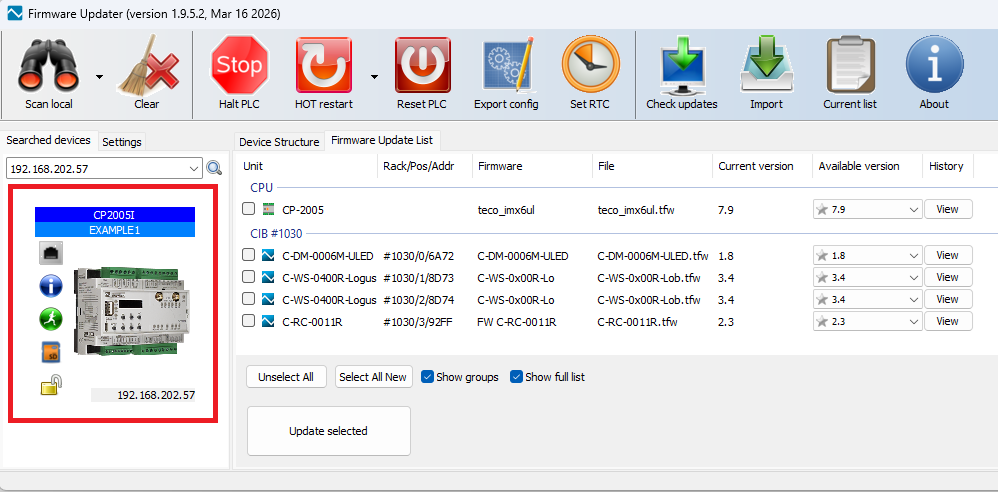
You can open Firmware Updater tool from Mosaic tools. When you are connected to the PLC from Mosaic, the IP address is taken over and Firmware Updater connects to the PLC. Then just click on the PLC image in the left part of the Firmware Updater window and a list of all modules connected to the controller and their firmware versions will be retrieved from the PLC. The modules for which an update is available are marked in red.
IP camera image object in WebMaker is an object that periodically loads a JPG image from the URL you enter. You specify the address where the IP camera publishes the image in JPG format, and you can set the refresh period in ms. If you set it to 0, the image is loaded only once on page open and it can be used for some MJPEG streams.
The delay is more likely caused by:
- the refresh period you configured in WebMaker,
- the camera’s own response time,
- browser caching,
- or the PLC web page refresh.
It takes some time to load the image, so the size of the image can also affect the delay. I don't know if the IP camera provides images in different resolutions. Then it would be possible to include the & separator in the url and reduce the size of the loaded image.
For example http://192.168.1.100/snapshot.jpg?user=admin&password=1234&resolution=640x480
Your answer
You have to be signed-in for asking a question. Continue after sign-in.